
Edubin | LMS Education WordPress Theme
Author: Pixelcurve
Update: 28 June, 2026
How to install Edubin Education WordPress Theme
Follow the steps in the Installation section below.
Video Tutorials
Click any tutorial to watch it in a popup player. Visit the Pixelcurve YouTube channel for more tutorial videos that will help you build your new site.
Installation
Follow the steps below to setup install WordPress Theme:
- Login to WordPress admin panel
- Go to: Appearance > Themes
- Click on the Add New button, then click on the Upload New
- Upload theme zip file
- Click on the Activate button

Run Setup Wizard
After activating the theme installation process will be started.

List of required plugins
- Edubin Core - Required and must install plugin.
- Elementor Page Builder - Required Page builder plugin.
- One Click Demo Import - Required if you want to import demo contents. You can deactivate it after demo is imported.
List of recommended plugins
- WooCommerce - Recommended. Install if you want commerce/store functionality.
- The Event Calendar - Recommended. This plugin will help you to build & edit the event section of our theme.
- Envato Market - Recommended. This plugin helps you automatic updates to your Themes & Plugins purchased through Envato Market.
- Contact Form 7 - Recommended. This plugin helps you to create forms.
Tutor LMS recommended plugins
- Tutor LMS - Install if you want LMS (Learning Management System) feature. (required)*
- Tutor LMS Pro - This plugin will allow you to use the professional versions of Tutor LMS.
- Tutor LMS Certificate Builder - Optional. Tutor LMS Certificate Builder allows anyone to create certificates that they want to present to their users.
- Certificate customizer for Tutor LMS - Optional. An example of a custom certificate development process for Tutor LMS Pro.
- Tutor LMS - Migration Tool - Optional. Move all your course, quiz, order data information and everything else from your LMS to the better Tutor LMS by simply clicking a button.
- Tutor LMS Elementor Addons - Optional. Tutor LMS Elementor widgets to create an entire eLearning site and design custom course pages, course carousels, listings, and more.
LearnDash LMS recommended plugins
- LearnDash LMS - Install if you want LMS (Learning Management System) feature. (required)*
- LearnDash Course Grid - Adds extra feature Intro video, short description and duration etc.
- LearnDash Certificate Builder Optional - Create certificates for online courses.
- WooCommerce For LearnDash - Optional - Easy to connect WooCommerce to your LMS website
To get more 3rd party addons for LearnDash. click here.
LearnPress LMS recommended plugins
- LearnPress LMS - Install if you want LMS (Learning Management System) feature. (required)*
- LearnPress - Course Review - It will add review for course
- LearnPress - Course Wishlist - Optional. It will add wishlist feature for the course
- LearnPress - WooCommerce Payment Methods Integration - Optional. Easy to connect WooCommerce to your LMS website
- LearnPress - 2checkout Payment - Optional. Authorize.Net payment gateway for LearnPress.
- LearnPress - Paid Membership Pro Integration - Optional. Allow to buy courses via subscriptions.
- LearnPress - Co-Instructors - Optional. Allow multiple instructors to edit content.
- LearnPress - Certificates - Optional. Create certificates for online courses.
- LearnPress - Instructor Commission - Optional. Manage percent of commission for each course & support withdrawal via PayPal
- LearnPress - Students List - Optional. Student List let people check the list of students who have signed up for the course.
- LearnPress - Collections - Optional. Collecting related courses into one collection by administrator.
- LearnPress - Content Drip - Optional. Allows you to manage course's opening time.
- LearnPress - Fill In Blank Question - Optional. Supports type of question Fill In Blank lets user fill out the text into one ( or more than one ) space.
- LearnPress - H5P Content - Optional. H5P Content add-on for LearnPress.
- LearnPress - myCRED Integration - Optional. Running with the point management system - myCRED.
- LearnPress - Prerequisites Courses - Optional. Course you have to finish before you can enroll to this course.
- LearnPress - Random Quiz - Optional. Randomize questions inside quiz.
- LearnPress - Sorting Choice Question - Optional. Sorting Choice provide ability to sorting the options of a question to the right order.
Sensei LMS recommended plugins
- Sensei LMS - Install if you want LMS (Learning Management System) feature. (required)*
- Sensei LMS Certificates - Optional. It allows you to award your students with a certificate of completion for their completed courses.
- Sensei LMS Media Attachments - Optional. It provides your students with easy access to additional learning materials, from audio files to slideshows and PDFs.
- Sensei Post to Course - Optional. It allows to turn your blog posts into online courses.
Import Dummy Content
After finishing plugin install click on Import Dummy Content button to import dummy data.

Demo Import
Our Theme have one click demo import feature. Please follow the video to install theme and import the demo.
You'll find 4 different LMS plugin supported Demo. Choose demo with your favorite LMS plugin. Simply click on the LMS name on the tab. Then import your demo.
Theme Options
From Admin menu, navigate to Edubin -> Theme Options. Then you will find all theme related settings.

After clicking theme option you'll find this kind of interface as like the following screenshot below. From here you can find theme related settings.

General
In the theme option you'll find general settings like in the screenshot below

Colors
Theme Color : In the theme color section you'll see 2 different color option. See the screenshot to know which color option change which color.

Button Color : From this color settings you can change all the anchor tag link color and all button color and hover color in the website.

Link Color : From this color settings you can change all of the button color and hover color in the website.

Placeholder Color : You can change all input and textarea's placeholder color using this color settings. See the screenshot.

Default WordPress Colors : You can change the page's background color using this color settings. See the screenshot.

Typography
From this typography settings you can change the body font size, weight, line hight and heading font size, weight, line height etc.

Background Image
Using this settings you can change whole page's background image

Preloader
In preloader section you can change the preloader style of your site. There are 2 different styles of preloader.

Social Links
Using this setting you can control the style of header top social icon, You can show/hide or the follow us text also. See the screenshot

Social Share
From this settings you can control course page's social links as like in the screenshot below.

Back to Top
This settings will allow you to show or hide the back to top button from every page.

404 Not Found Page
From this settings you can change the style of 404 not found page. Check the screenshot.

RTL
From this settings you can make your website's content align right to left. RTL meaning right to left. There are some language that are written from left. To support those languages you can use RTL button. By turning on the RTL button all of the content will be left align. And if you want to control the header element align check out the other buttons.

Utilities
Featured Image : By turning on page featured image you can add featured image for a page.

Multiple LMS : If you turns on multiple LMS active notice you will get notice on the admin page that 2 or more LMS plugin are active at the same time.

Libraries
CSS Libraries : You can turn off or on the CSS libraries features in your website from here.

JS Libraries : You can turn off or on the JS libraries features in your website from here.

Header
In the header section you'll find header related settings.

Site Name & Logo
Logo : From here you can change your site logo from here. If you have one or more transparent header on your site you can select secondary logo from secondary logo option. See the screenshot

Mobile Logo : You can select logo for small devices from here. You can also change logo size, screen width from which screen the mobile logo will appear, logo top bottom space etc.
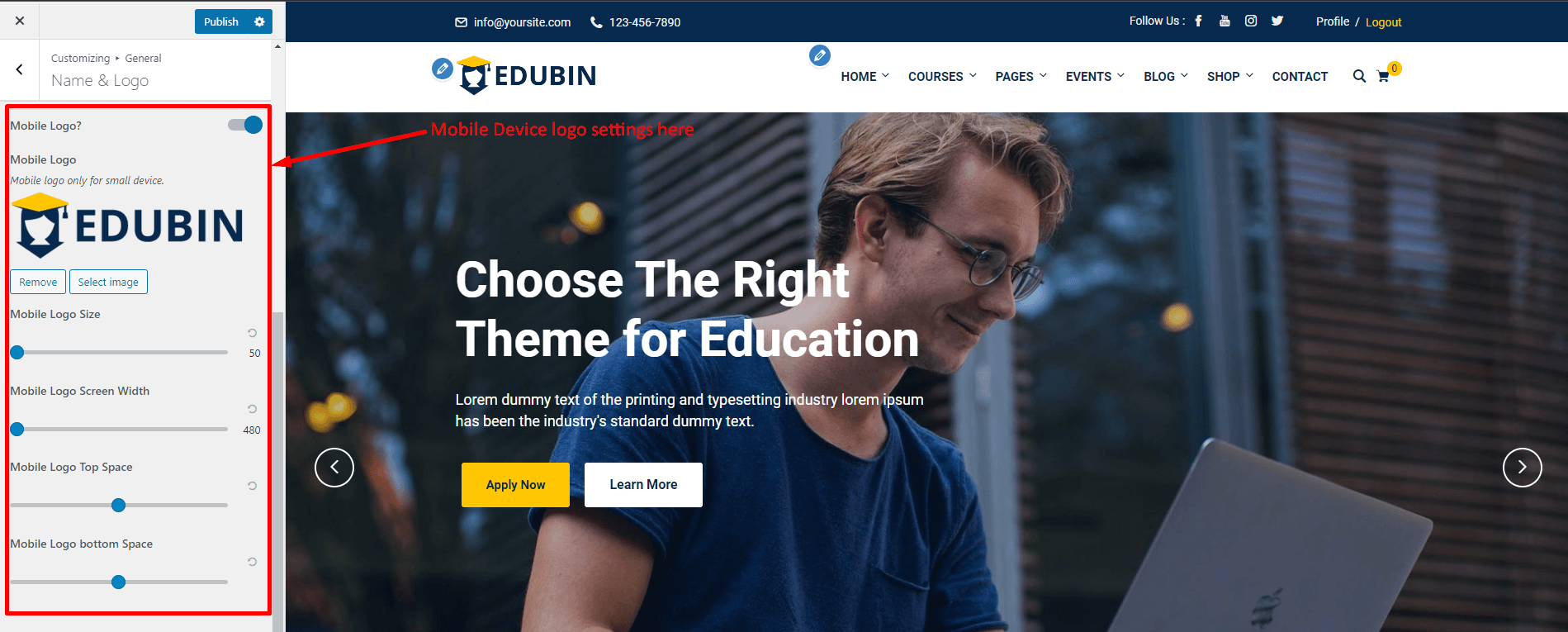
Site title & Tagline : You can change your site title from here. You can also change the site tagline from here.

Site Icon/Favicon : You can change your site icon/favicon from here.

Header Global
From header global settings you can select the default header for all pages. The are two different header one is theme header and other one is elementor builder. Theme header is the default header of our theme. And in elementor builder theme 2 different header that we have created. If you wanted to create another header you can build that using elementor and use that header from here.

Header Top
Header Top 1 : From header top you can find header to ON/OFF button to show or hide the header top bar. You can also change the email, phone number, top message and top message animation from here. See the screenshot.

In the bottom of this section you can find some more settings. From here you can change the top widget position, login/register button text and logout and profile button text also.

Header Area
From header main settings you will find main header related options. From here you can select header styles, header sticky active, show/hide the search and cart button. Then you will also find the header spacing section and submenu wrapper width. From here you can increase or decrease all kind of spaces.

Header Menu
From header main settings you will find header menu and submenu related options. From here you can select menu and submenu spacing.

Header Menu / Submenu Spacing : Using this settings you can set header menu and submenu colors. See the screenshot below

Page Title
Page Title and Spacing : Using page header settings you can change the page header styles. You can hide or show the page header/page title from here. You can also change the page header top and bottom spaces. You can also change the alignment of page header from here. You can change the page title tag also.

Page Title Height and Background : You can also change the page header background images from here. You can change the page header height from here.

Breadcrumb : You can turn of or on page title breadcrumb from here. You can also set breadcrumb from shortcode and set the breadcrumb color from here.

Blog
From blog section you can change the settings of blog list page, blog single page and related blog posts
Blog Page
Sidebar : From here you can show the sidebar to left or right. You can also hide the entire sidebar by clicking no sidebar option.

Sidebar Width : You can change the sidebar width from here. There are two different sidebar width. 25% and 33%.

Sidebar Side Gap : You can change the sidebar Gap from here. There are many gap size available. See the screenshot.

Sidebar Sticky : You can make the sidebar sticky by turning on the sidebar sticky switch.

Post Meta Items : The following options in the screenshot will allow to control post meta. See the screenshot below.

Blog Single
Sidebar : From here you can show the sidebar to left or right. You can also hide the entire sidebar by clicking no sidebar option.

Sidebar Width : You can change the sidebar width from here. There are two different sidebar width. 25% and 33%.

Sidebar Side Gap : You can change the sidebar Gap from here. There are many gap size available. See the screenshot.

Sidebar Sticky : You can make the sidebar sticky by turning on the sidebar sticky switch.

Post Meta Items : The following options in the screenshot will allow to control post meta. See the screenshot below.

Tag View : You can show or hide the tags from blog single page. See the screenshot.

Social Share : By turning on or off the switch named social share will show or hide the social share option. See the screenshot.

Page Navigation : Using this option you can show or hide the page navigation button. See the screenshot below.

Related Post
From here you can control the blog related section. You can change the title from here. You can set the number of how many post will show on that section. Also you can change the column number of related post. You can show related post by category or tags. See the screenshot below.

WooCommerce
From WooCommerce section you can change the settings of Shope page and Checkout page.
Store Notice
If you wanted to show your shop page as a demo shop you can turn on this 'Store Notice' option.

Product Catalog
From this settings you can showcase your product like how many columns will be shown in the shop page and many more.

Product Images
In this settings you can select your shop page image sizes like the thumbnail size or the main images and the ratio between thumbnail and main image also.

Checkout
From these setting you can control company name, address line 2, phone fields if they will be shown as required or optional or hidden. You can select the privacy and the terms and condition page from here. You can Also edit the privacy and terms and condition texts from here.


Reviews
Using this setting you can show or hide the review from the shop single page.

LearnPress LMS
In this settings you can find all kind of LearnPress LMS related settings.

Archive Pages
From archive page settings you can control the courses/course archive page. There are 6 different styles of courses page. You can set the course column number from here. You can also change the courses page name from here. You can show or hide course title by turning off/on the switch labeled as title. You can show/hide course's image or video by turning on/off media switch.

In the bottom of this section you can also find more settings. You will find several switch. You can show or hide price, review star, review text, instructor's image and name, quiz, categories etc using these switch. See the screenshot below.


Single Page
Styles & Preview Media : There are 4 styles of course single page and you can change that from styles option. In preview option you can show the video or course image in the sidebar or in the content area. See the screenshot.

Header Meta : Using header meta switch you can hide/show header meta. See the screenshot.

Breadcrumb : Using breadcrumb switch you can show/hide course single page's breadcrumb. Look at the screenshot below.

Sidebar Sticky : Using this option you can make the sidebar sticky.

Course Category : Using this you can show/hide the course categories from the sidebar.

Social Share : This settings will allow you to show/hide the social share option.

Course Info : Using this you can show/hide the course information from the sidebar.

Instructor : This settings will allow you to show/hide the instructor's information from header meta.

Review & Last Update : Using these settings you can show or hide the review stars and the last update date of course single page.


Excerpt & Enroll Button : This setting will allow you to show or hide the excerpt and buy now/enroll button.

Course Features
Course Features Title : You can change, add or remove the course features title from here.

Enrolled : You can change the text of enrolled meta from here. You can also remove the enrolled section from here.

Course Features : Using these settings you can control all the course features like in the screenshot. You can edit duration, assessments, skill level, category and language from here. You can also hide them by turning of the switch individually.


Related Courses
Related Course Preview : You will get 2 option from related course preview. Using this setting you can show your related course in the content area. See the screenshot below

Or you can preview your related course in the sidebar like in the screenshot below.

Related Course Style : You can change the sidebar related course style. There are two styles. You can make the image rounded or square. See the screenshot.

Custom Heading & Course Item : From custom heading you can change the related course title. And from course item you can set the number of how many related course will be showed in the section.

Utilities
By turning on override LearnPress setting color will will give you the functionality to change the default color settings of courses.

LearnDash LMS
In this settings you can find all kind of LearnDash LMS related settings.

Course Archive Pages
From archive page settings you can control the courses/course archive page. There are 6 different styles of courses page. You can set the course column number from here. You can also change the courses page name from here. You can show or hide course title by turning off/on the switch labeled as title. You can show/hide course's image or video by turning on/off media switch.

In the bottom of this section you can also find more settings. You will find several switch. You can show or hide the media image and also you can select media and it's size. Also you can show or hide intro video button, title, excerpt or price from here. See these screenshot below.

You can also show or hide lessons, lessons text, topics, categories, review star, review text, instructor's image and name etc using these switch

From here you can align the pagination.

Course Single Page
Styles & Preview Media : There are 4 styles of course single page and you can change that from styles option. In preview option you can show the video or course image in the sidebar or in the content area. See the screenshot.

Header Meta : Using header meta switch you can hide/show header meta. See the screenshot.

Breadcrumb : Using breadcrumb switch you can show/hide course single page's breadcrumb. Look at the screenshot below.

Sidebar Sticky : Using this option you can make the sidebar sticky.

Course Category : Using this you can show/hide the course categories from the sidebar.

Social Share : This settings will allow you to show/hide the social share option.

Course Info : Using this you can show/hide the course information from the sidebar.

Instructor : This settings will allow you to show/hide the instructor's information from header meta.

Review & Last Update : Using these settings you can show or hide the review stars and the last update date of course single page.


Excerpt & Enroll Button : This setting will allow you to show or hide the excerpt and buy now/enroll button.

Related Courses
Related Course Preview : You will get 2 option from related course preview. Using this setting you can show your related course in the content area. See the screenshot below

Or you can preview your related course in the sidebar like in the screenshot below.

Related Course Style : You can change the sidebar related course style. There are two styles. You can make the image rounded or square. See the screenshot.

Custom Heading & Course Item : From custom heading you can change the related course title. And from course item you can set the number of how many related course will be showed in the section.

Price, Lessons and Topics : Using these switch you can show or hide the price, lesson and the topic meta item from related courses.

Utilities
By turning on override LearnPress setting color will will give you the functionality to change the default color settings of courses.

Tutor LMS
In this settings you can find all kind of Tutor LMS related settings.

Course Archive Pages
From archive page settings you can control the courses/course archive page. There are 6 different styles of courses page. You can set the course column number from here. You can also change the courses page name from here. You can show or hide course title by turning off/on the switch labeled as title. You can show/hide course's image or video by turning on/off media switch.

In the bottom of this section you can also find more settings. You will find several switch. You can show or hide the media image and also you can select media and it's size. Also you can show or hide intro video button, title, excerpt or price from here. See these screenshot below.

In the bottom of this section you can also find more settings. You will find several switch. You can show or hide lesson, enrolled students, level and wishlist using these switch. See the screenshot below.

In the bottom of this section you can also find more settings. You will find several switch. You can show or hide categories, review star, review text, instructor's image and name etc using these switch. See the screenshot below.

Course Single Page
Styles : There are 4 styles of course single page and you can change that from styles option. See the screenshot.

Header Meta : Using header meta switch you can hide/show header meta. See the screenshot.

Breadcrumb : Using breadcrumb switch you can show/hide course single page's breadcrumb. Look at the screenshot below.

Sidebar Sticky : Using this option you can make the sidebar sticky.

Course Category : Using this you can show/hide the course categories from the sidebar.

Social Share : This settings will allow you to show/hide the social share option.

Instructor : This settings will allow you to show/hide the instructor's information from header meta.

Review, Last Update & Excerpt: Using these settings you can show or hide the review stars and the last update date of course single page.

Related Courses
Related Course Preview : You will get 2 option from related course preview. Using this setting you can show your related course in the content area. See the screenshot below

Or you can preview your related course in the sidebar like in the screenshot below.

Related Course Style : You can change the sidebar related course style. There are two styles. You can make the image rounded or square. See the screenshot.

Custom Heading & Course Item : From custom heading you can change the related course title. And from course item you can set the number of how many related course will be showed in the section.

Utilities
By turning on "override Tutor setting color" will give you the functionality to change the plugin default color settings of courses.


Sensei LMS
In this settings you can find all kind of Sensei LMS related settings.

Course Archive Pages
From archive page settings you can control the courses/course archive page. There are 6 different styles of courses page. You can set the course column number from here. You can also change the courses page name from here. You can show or hide course title by turning off/on the switch labeled as title. You can show/hide course's image or video by turning on/off media switch.

In the bottom of this section you can also find more settings. You will find several switch. You can show or hide the media image and also you can select media and it's size. Also you can show or hide intro video button, title, excerpt or price from here. See these screenshot below.

In the bottom of this section you can also find more settings. You will find several switch. You can show or hide lesson, enrolled students, level and wishlist using these switch. See the screenshot below.

In the bottom of this section you can also find more settings. You will find several switch. You can show or hide categories, review star, review text, instructor's image and name etc using these switch. See the screenshot below.

Course Single Page
Styles : There are 4 styles of course single page and you can change that from styles option. See the screenshot.

Header Meta : Using header meta switch you can hide/show header meta. See the screenshot.

Breadcrumb : Using breadcrumb switch you can show/hide course single page's breadcrumb. Look at the screenshot below.

Sidebar Sticky : Using this option you can make the sidebar sticky.

Course Category : Using this you can show/hide the course categories from the sidebar.

Social Share : This settings will allow you to show/hide the social share option.

Review, Last Update & Excerpt: Using these settings you can show or hide the review stars and the last update date of course single page.

Related Courses
Related Course Preview : You will get 2 option from related course preview. Using this setting you can show your related course in the content area. See the screenshot below
Or you can preview your related course in the sidebar like in the screenshot below.
Related Course Style : You can change the sidebar related course style. There are two styles. You can make the image rounded or square. See the screenshot.
Custom Heading & Course Item : From custom heading you can change the related course title. And from course item you can set the number of how many related course will be showed in the section.
Utilities
If you turn on the custom lesson style button the lessons will the theme style like the following screenshot.

And if you turn it of the lessons will have the default style. see the screenshot

The Events Calendar
In this section you can find the settings of event archive page and event single page
Archive Page
Custom Page Title : You can change event archive page title from here.

Page Layout, Events Item & Event Columns : From page layout you can change the layout of the page. There are two options, Grid layout and Plugin default. And from event items you can select the number that how many event will shown in event archive page. And finally you can set the column of events from event columns section.

More Settings : If you have any intro video on your event you can show/hide them using intro video switch. You can show or hide date, time, venue, price, meta sing the following switch. You can also change the date, time format and the separator. See the screenshot below.

Single Page
Page Layout : You change the event single page layout from here. There are two different layout styles.

Countdown : You can show or hide the countdown from the sidebar using this switch.

Maps : Using this switch you can show or hide the map. See the screenshot below

More Settings : You can show or hide event cost, start time, end time, website, phone, email, organizer, location by turning on/off those switch. See the screenshot below

After Content : Using this option you can add or remove add to calender functionality.

Footer
From footer option you can edit footer. But if you build your footer with elemenotr then the settings in customizer will not work. If you build your footer using elemenotr you will find the setting on dashboard footer menu.

Footer Global
From here you can select the footer which you wanted to use. You can use theme footer or elementor footer builder. If you use elementor footer you can select them from select elementor footer. You can change the theme footer variations too. See the screenshot

Footer Area
From footer widget you can select the number of column of footer area. See the screenshot

Copyright
You can show or hide the footer copyright area from here. You can also change the footer copyright text from here. You can hide the copyright section on mobile devices. See the screenshot

LMS Settings
LMS Settings could be different and it based on which LMS supported demo you've imported. Our theme supports 5 different LMS plugin. For example if you've imported LearnPress Demo LearnPress plugins will installed and you can see LearnPress options.
LearnPress
Courses and Lessons
Using these settings you can create, edit or add a new course or lesson. follow the video below.
Quizzes
In this setting you can see the list of all quizzes in the Course. You can Edit, Delete, Add an new quize from here. Follow the video below.
Languages
From this setting you can see the course language lists. You can also add new language from here.

Questions
In this setting you can see the list of all Questions in the Course. You can edit, delete, add an new questions from here. You can find out which questions is assigned with which course.

Orders
From here you can see how many order you have. You can see that how many courses has been sold out from your site. And who is the buyer. And you can see the order status if they are completed or processing.

Categories
In this section you can see the course categories list. You can add new categories or edit existing categories from here.

Tags
In this section you can see the course tags list. You can add new tags or edit existing tags from here.

Statistics
From here you can see the statistics of your site. You can see how many people has visited on your site and you can also see course statistics, order statistics etc.

Add-ons
From here you can install add-ons such as assignment add-ons etc. There are few add-ons that are for free. And most of them are paid for LearnPress LMS plugin

Settings
In the general settings of the LMS you can set the pages like the checkout page, profile page, terms and condition page and many more from the page setup. See the screenshots below

You can also find currency settings in general section. You can select your currency, currency position, thousands separator, decimal separator and The number of decimals from here. See the screenshots below

If you wanted to know about more settings of LearnDash LMS follow the video below.
LearnDash
Courses
In this setting you can show the list all courses of your education website. From here you can edit courses, delete courses, add new courses etc. You can edit course's name slag etc.
Lessons & Topics
In this setting you can see the list of all lessons or topics in the course. You can edit, delete, add an new lesson/topics from here. You can also see which lesson/topic is assigned with which course.
Quizzes
In this setting you can see the list of all quizzes in the course. You can Edit, Delete, Add an new quizze from here. You can find out which quizze is assigned with which course. See the video below.
Adding Quize: Learn how to add quizes to your course in the video below.
Quizze Settings: Here is some other quizze settings in the video below.
Questions
In this setting you can see the list of all Questions in the Course. you can edit, delete, Add an new questions from here. You can find out which questions is assigned with which course.

Certificates
You can create course certificates from here.
Groups
This section will explore how to manage students, as well as explain the concept of groups (memberships), and how you can leverage them to better manage, track and communicate with your users. Follow the video.
Challenge Exam
In this section you can set up challenge or exam for the students. Follow the video.
Assignments
Using this settings you can check submitted assignments of all students.

Reports
From here you can export user's quizze and course data.

Settings
In the settings section you can see lots of other settings like following the screenshot below.

Focus Mode
If you want to know about focus mode on LearnDash follow the video below
User Registration
Learn How to enable customized user registration for LearnDash courses.

Stripe Payment
In the video below learn how to add stripe payment feature in LearnDash.
Tutor
Courses
In this setting you can show the list all courses of your education website. From here you can edit courses, delete courses, add new courses etc. You can edit course's name slag etc.

Categories
From here you can see all categories. You can also add, delete, edit categories from here.

Tags
In this setting you can see the list of all Tags. You can edit, delete, add an new tags from here.

Languages
From this setting you can see the course language lists. You can also add new language from here.

Students
From here you can see that how many students you have, and the student have purchased.

Announcements
Using this settings you can make an announcement for the students. You can edit, delete, or add a new announcement from here.

Q & A
Using this Q&A setting you can see how many Q & A sessions has done on your education site.

Quiz Attempts
You can see how many Quiz attempts were happened on your education site.

Add-ons
From here you can use addon of tutor LMS. But you can only use these add-ons if you buy Tutor Pro LMS.

Settings
General : In the general settings of the LMS you can set the pages like the Dashboard page, terms and condition page and many more from the general section. Watch the video below
Course : In the course section you can find all of the course settings. Watch the video below.
Monetization : You can find monetization section under the setting. From here you can find all kind of monetization related settings.
Design : You can also find Design section under the setting. From here you can find all kind of design related settings like the course column, author design etc. But you don't need to use there for most of the time. Our theme has the perfect design for all of these.
Advance : And lastly You find Advance section under the setting. From here you can find some advanced settings like Gutenberg Editor, Hide Course Products on Shop Page, Course Archive Page etc.
More Video Tutorials: To find more settings related tutorial follow this YouTube video link.
Sensei
Courses
In this setting you can show the list all courses of your education website. From here you can edit courses, delete courses, add new courses etc. You can edit course's name slag etc.

Modules
From here you can see all modules. You can also add, delete, edit modules from here.

Languages
From this setting you can see the course language lists. You can also add new language from here.

Lessons
From this setting you can see the course lessons lists. You can also add new lessons from here.

Students
From here you can see that how many students you have, and the student have purchased.

Grading
Using this settings you can see all grades for each courses.

Messages
Using this messages setting you can see all the messages of on your education site.

Reports
You can see all the reports of all of your students on your education site.

Settings
In the settings option of the LMS you can get the important options like Access Permissions, Disable Private Messages, Course Archive Page where you can set the course archive page and many more.

Elementor Elements
We have created several elementor elements to design our theme easily. You can find them from Edubin Addons tab in the elementor. Let's discuss with some of our created elementor elements.

Blog Posts
Using this element you can create awesome blog layout like in the following screenshot. You will find 2 different styles in blog element.

Call to Action
Using this element you can create call to action section like in the following screenshot.

Advance Slider
Using this element you can create and edit slider area like in the following screenshot.

Custom Category
This element will allows to make category item. Follow the screenshot.

Category (LearnPress)
This element will allows to make category item that have some functionality from the LMS plugin. You can show how many course the category have. Follow the screenshot.

Contact Forms 7
To design contact form easily we've created this element. Follow the screenshot below.

Counter
Using this element you can build counter like in the following screenshot below.

Custom Title
Using this element you can create custom pre styled title like in the following screenshot.

Hero Section 1
Using this element you can easily create pre styled hero. This is hero element 1. Follow the screenshot.

Hero Section 2
Using this element you can easily create pre styled hero. This is hero element 2. Follow the screenshot.

Hero Section 3
Using this element you can easily create pre styled hero. This is hero element 3. Follow the screenshot.

Hero Section 4
Using this element you can easily create pre styled hero. This is hero element 4. Follow the screenshot.

Hero Section 5
Using this element you can easily create pre styled hero. This is hero element 5. Follow the screenshot.

Hero Section 6
Using this element you can easily create pre styled hero. This is hero element 6. Follow the screenshot.

The Events Calendar
You can use this element to create event sections as like the following screenshot.

Custom Icon
You can use this element to create sections with icon and text as like the following screenshot.

Teacher
Using this element you can create pre styled teacher section like in the following screenshot.

Testimonial
Using this element you can create testimonial like this. Follow the screenshot. You will find 7 different styles in testimonial element

Video Popup
You can create video Popup button using this element. Follow the screenshot below.

Countdown
You can create countdown section using this element. Follow the screenshot below.

Course Instructor
Using this you can create course instructor section as like the following screenshot below.

Image Carousel
This element will help you to create custom image carousel as like the following screenshot below.

Section Title
Using this element you can create section title as like the following screenshot below.

WooCart
Using this element you can add cart button in the header. See the screenshot below.

Delimiter
Using this element you can add a vertical line as a separator. See the screenshot to understand.

Icon + Text
Using this element you can add call us now section in the header like the screenshot below.

Logo
Using this element you can add logo in the header section. See the screenshot below.

Header Menu
Using this element you can create menu for the header like the screenshot below.

Footer Menu
This element will help you to create menu for the footer section like the screenshot below.

Search
Using this element you can add Search button in the header. See the screenshot below.

Login Join Button
This element will allow you to add login/register joint button in the header. See the screenshot below

Woo Product
This element will allow you to create a WooCommerce shop section as like the following screenshot below

LearnDash Courses
Using this element you can create awesome course section with drag and drop like in the screenshot. You will find 6 different styles in LearnDash courses element.

LearnDash Course Filter
This element will allow you to create course filter like in the following screenshot. You will find 3 different styles in LearnDash courses filter element.

LearnPress Courses
Using this element you can create awesome course grid section with drag and drop. Follow The screenshot. You will find 6 different styles in LearnPress courses element.

LearnPress Course Filter
This element will allow you to create course filter like in the following screenshot. You will find 3 different styles in LearnPress courses filter element.

Tutor Courses
Using this element you can create awesome course grid section with drag and drop. Follow The screenshot. You will find 6 different styles in Tutor courses element.

Tutor Course Filter
This element will allow you to create course filter like in the following screenshot. You will find 3 different styles in Tutor Courses Filter element.

Tutor Course Search
This element will allow you to create course search bar like in the following screenshot. You will find 3 different styles in Tutor Courses Filter element.

LearnPress Course Search
This element will allow you to create course search bar like in the following screenshot. You will find 3 different styles in Tutor Courses Filter element.

Sensei Courses
Using this element you can create awesome course grid section with drag and drop. Follow The screenshot. You will find 6 different styles in Sensei courses element.

Sensei Course Filter
This element will allow you to create course filter like in the following screenshot. You will find 3 different styles in Sensei Courses Filter element.

Programs
This element will allow you to create Programs like in the following screenshot.

Mailchimp
This element will allow you to create a subscribe or message form like in the following screenshot. If you install mailchimp plugin you'll see this elemnet.

The Event Calender
This plugin will allow to manage all kind of events in your site. To know more about this follow the given video playlist below.
In our theme we've used this plugin (The Event Calender) to manage all kind of events. This plugin have premium version also. To use these features download free version of the plugin from here.
WooCommerce Shop
WooCommerce is the world's most popular open-source eCommerce solution. The theme is fully compatible with WooCommerce. To know how to buy or sell your products using our theme follow the video Playlist.
Child Theme
A child theme allows you to change small aspects of your site's appearance yet still preserve your theme's look and functionality. To understand how child themes work it is first important to understand the relationship between parent and child themes.
You can install child theme after main theme installation. - https://developer.wordpress.org/themes/advanced-topics/child-themes/
FAQs
Support
If you have any questions, ideas or suggestions, please create ticket through our support channel Support Desk
We usually respond within 24 hours of each ticket. But it can take up to 2 days.
Don't forget to Rate this theme
Please Add your Review (Opinion) for Our theme. It would be a great support for us.
Go to your Themeforest Profile > Downloads Tab > & then You can Rate & Review for our theme.
Thank You.
Changelog
Show / hide full changelog
= 9.6.7 - 02 November 2026 =
- Dark Version demo included
- Improved the demo import export feature
- Lifter LMS course addon bug issue fixed

= 9.6.6 - 04 October 2026 =
- Updated breadcrumb shortcode feature

= 9.6.5 - 27 August 2026 =
- Course filter widget list view style issue

= 9.6.4 - 14 August 2026 =
- Improved video popup style and video popup addon

= 9.6.3 - 02 August 2026 =
- Supported with Dailymotion, TikTok, TED, Wistia, WordPress.tv, MP4 course details page video popup

= 9.6.2 - 20 July 2026 =
- Fixed some CSS style issue

= 9.6.1 - 08 July 2026 =
- Fixed edubin core plugin update issue

= 9.6.0 - 28 June 2026 =
- Updated outdated WooCommerce template file issue
- Fixed some CSS style issue

= 9.5.17 - 25 June 2026 =
- Improved One Click Demo import feature
- Replaced dummy site URL to current imported site URL
- Fix zoom archive page seeings option
- Fix google font error issue on guttenberg custom HTML block

= 9.5.16 - 06 June 2026 =
- Fix: Isotope broken issue on elementor editor mode
- Added: Course details page header background color change option

= 9.5.15 - 28 May 2026 =
- Fix: Fixed theme validation issue reported during review process
- Fix: Minor code and documentation cleanup
- Improved: compatibility with latest WordPress theme standards
- Added: Missing "Requires PHP" header in style.css for Envato Theme Check compliance

= 9.5.14 - 20 May 2026 =
- Updated: Zoom meeting Elementor widget setting options

= 9.5.13 - 11 May 2026 =
- Improved: LearnPress LMS co instructors tabs content style
- Updated: Zoom meeting archive page style and setting

= 9.5.12 - 11 April 2026 =
- Improved: Some style issue for Academy LMS plugin.
- Updated: Theme Setting options.

= 9.5.11 - 30 March 2026 =
- Added: Full compatibility with Academy LMS plugin.
- Improved: UI/UX and CSS enhancements.
- Fixed: WooCommerce review duplication issue.

= 9.5.10 - 26 March 2026 =
- Added: Course badge feature for LearnDash LMS.
- Improved: Mobile navigation icons and usability.

= 9.5.9 - 12 March 2026 =
New: LearnDash LMS course sale & regular price option
Updated: Theme color setting option

= 9.5.8 - 07 March 2026 =
Updated: LearnDash LMS course price function
Fix: Some CSS style issue

= 9.5.7 - 03 January 2026 =
Fix: Advanced slider widget subtitle show/hide issue
Updated: Shape and animation widget animation updated

= 9.5.5 - 19 November 2025 =
Fix: Section title addon style issue
Fix: Basic slider addon carousel issue

= 9.5.4 - 13 November 2025 =
Fix: carousel slider issue for advanced slider, WooComerce and Event widgets

= 9.5.3 - 06 November 2025 =
Fix: Tutor LMS Native payment cart count auto update issue

= 9.5.2 - 31 October 2025 =
Fix: Category carousel widget slider bug issue

= 9.5.1 - 31 October 2025 =
Fix: Tutor LMS native payment cart wrong URL.
Fix: Some of CSS issue

= 9.5.0 - 13 October 2025 =
Improved: Speed improved, optimize code & load CSS JS file separately
Improved: Edubin welcome dashboard panel
New: WooCommerce add to cart animation
New: Tutor LMS add to cart icon for Native payment
Updated: WooCommerce outdated template file

= 9.4.10 - 09 September 2025 =
Updated: WooCommerce settings options
Updated: WooCommerce outdated template file

= 9.4.9 - 25 July 2025 =
Updated: WooCommerce outdated template file

= 9.4.1 - 19 February 2025 =
Fixed: LearnDash LMS language preview issue for the course singe page

= 9.4.0 - 15 February 2025 =
Updated: Some minor CSS issue
Updated: Blog page comments preview section

= 9.3.15 - 27 January 2025 =
Updated: WooCommerce old template file
Improved: Desible WoooCommerce setup wizard for theme installation
Improved: Header top area email, phone text with icon area

= 9.3.14 - 24 December 2024 =
Fix: Conflict issue with latest version Elementor and WordPress

= 9.3.13 - 21 December 2024 =
Fix: LearnPress LMS continue button translate issue

= 9.3.12 - 19 December 2024 =
Fix: Conflict issue with latest version Elementor with Edubin Core plugin

= 9.3.11 - 12 December 2024 =
Updated: RTL demo and fix some style issue

= 9.3.9 - 26 November 2024 =
Added: Event addon price show/hide option.
Updated: WooCommerce widgets preview option

= 9.3.8 - 23 November 2024 =
Fix: Language compatibility issue with latest version WordPress

= 9.3.7 - 18 November 2024 =
Added: LearnDash LMS course single meta text update option
Fix: LearnDash LMS course single page broker issue with review plugin

= 9.3.6 - 14 November 2024 =
Fix: LearnPress LMS plugin customizer setting conflict issue
Fix: Updated LearnPress LMS course single page button issue

= 9.3.5 - 26 October 2024 =
Fix: Some minor CSS issue

= 9.3.4 - 21 October 2024 =
Updated: WooCommerce shop widgets options
Fix: PopUp login responsive issue
Fix: LearnDash LMS with LearnDash Course Review plugin conflict issue

= 9.3.3 - 13 October 2024 =
Updated: WooCommerce shop page category page style
Fix: Some CSS style issues

= 9.3.2 - 02 October 2024 =
Fix: Course filter widget shorting issue

= 9.3.1 - 29 September 2024 =
Fix: LearnPress LMS course price show/hide issue

= 9.3.0 - 20 September 2024 =
Updated: LearnPress LMS course features options

= 9.2.16 - 17 September 2024 =
Added: Compatible with latest version WooCommerce and updated WooCommerce template file.

= 9.2.15 - 12 September 2024 =
Added: Header to phone call URL enable/disable options.

= 9.2.14 - 05 September 2024 =
Updated: LearnPress course single page course feature show/hide issue

= 9.2.13 - 05 September 2024 =
FIx: Some minor CSS style issue

= 9.2.12 - 03 September 2024 =
FIx: Header sticky transparent logo issue

= 9.2.11 - 01 September 2024 =
New: Compatible with LifterLMS plugin
New: 3 Home Page Layout

= 9.2.10 - 26 August 2024 =
Fix: Some minor CSS style issue
Improved: Elementor & Theme container width
Updated: Accordion widget animation

= 9.2.9 - 20 August 2024 =
Fix: Bug fix for mobile drop down menu

= 9.2.8 - 18 August 2024 =
Fix: Course search and whole site search issue
Updated: Compatible with latest version LearnDash course review plugin

= 9.2.7 - August-10-2024 =
Improved: Advanced slider animation styles
Fix: LearnDash total student count issue.
Fix: LearnDash LMS course category page displaying issue

= 9.2.6 - July-28-2024 =
Fix: Tutor LMS course single page sidebar meta show/hide issue

= 9.2.5 - July-16-2024 =
Fix: Bug fix for the Course search query by cusom post type

= 9.2.1 - Jun-29-2024 =
Added: 4 New Home demos
New: Course search by query
Fix: Search PopUp issue

= 9.2.0 - Jun-28-2024 =
Added: Tutor LMS details course page price show/hide option
Added: Tutor LMS details course page enrolled button show/hide option
Updated: Course search option

= 9.1.9 - Jun-19-2024 =
Fix: Review issue for Masterstudy LMS
Fix: Tutor LMS course price issue

= 9.1.8 - Jun-18-2024 =
New: Compatible with Masterstudy LMS

= 9.1.7 - Jun-16-2024 =
Updated: Some of the WooCommerce page style
Fix: Logout URL issue

= 9.1.6 - Jun-12-2024 =
Updated: Some CSS style issue

= 9.1.5 - Jun-10-2024 =
Fix: Tutor LMS filter addon issue

= 9.1.4 - Jun-09-2024 =
Updated: Tutor LMS theme settings

= 9.1.3 - Jun-04-2024 =
Updated: LearnDash LMS widgets settings

= 9.1.2 - Jun-03-2024 =
Fix: New blog layout option not working issue
Fix: LearnDash LMS course lesson wrong count issue

= 9.1.1 - Jun-01-2024 =
Fix: Duplicate footer issue

= 9.1.0 - May-30-2024 =
Fix: Some CSS color issue
Updated: LearnPress LMS widget settings

= 9.0.9 - May-26-2024 =
Fix: Error issue for the old version of PHP

= 9.0.8 - May-26-2024 =
Updated: Updated theme option settings
Fix: Some CSS style issue

= 9.0.7 - May-25-2024 =
Fix: Some CSS style issue

= 9.0.6 - May-23-2024 =
Updated: New homepage demo import issue fix for Sensei LMS

= 9.0.5 - May-23-2024 =
Fix: Custom elementor footer select issue

= 9.0.4 - May-23-2024 =
Updated: Old version WooCommerce template files
Fix: Archive page custom heading change issue

= 9.0.3 - May-22-2024 =
Fix: Event page Error issue

= 9.0.2 - May-22-2024 =
Updated: Added some new homepage, bringing the total to 23 homepages, along with many new features.

= 8.14.17 - Sep-07-2023 =
Updated: Added Upcoming/Past/All Events preview option on the Event Calendar widget

= 8.14.16 - Sep-01-2023 =
New: Language School, Gym Coaching & Course Hub 3 new home layout included

= 8.14.15 - Aug-09-2023 =
Updated: Edubin Core plugin

= 8.14.14 - July-30-2023 =
Fix: Sensei single page loading issue

= 8.14.13 - July-28-2023 =
Updated: Some of theme settings options

= 8.14.12 - July-27-2023 =
Fix: Course archive page pagination issue

= 8.14.10 - July-19-2023 =
Fix: header top registration login URL issue

= 8.14.9 - July-14-2023 =
Fix: Some customizing settings issue

= 8.14.8 - July-04-2023
Updated: Kirki framework for customizing settings options

= 8.14.7 - June-14-2023 =
Fixed: Tutor LMS course single page variable error issue.
Fixed: Multiple LMS activated wrong notice issue.

= 8.14.6 - May-05-2023 =
Fixed: Social icon issue for header top area.

= 8.14.5 - April-03-2023 =
Updated: The event calendar widget option

= 8.14.4 - April-02-2023 =
Fix: The event Calendar addon date show/hide issue

= 8.14.3 - March-29-2023 =
Fix: Filter course search result not found issue

= 8.14.2 - March-27-2023 =
Updated: Course archive page course query function

= 8.14.1 - March-20-2023 =
Fix: Blog page background color transparent issue

= 8.14.0 - March-07-2023
Fix: Background color compatible issue for blog pages

= 8.13.30 - March-03-2023 =
Updated: LearnDash single page related course price, lesson, topic show/hide option

= 8.13.26 - December-28-2022 =
Fix: Edubin edubin_admin_notice_old_core_plugin function error issue

= 8.13.25 - December-27-2022 =
Fix: Edubin Core plugin update issue

= 8.13.24 - December-26-2022 =
Added: Warning message for multiple LMS activated

= 8.13.23 - December-06-2022 =
New: Added Sensei LMS Home v1 to Home v6 demos

= 8.13.22 - December-05-2022 =
Updated: Sensei LMS course demos

= 8.13.21 - December-01-2022 =
Fix: Social shear text translate issue

= 8.13.20 - November-30-2022 =
Updated: Typography for LearnPress & LearnDash LMS demos

= 8.13.19 - November-29-2022 =
Fix: WooCommerce My Account page address column width issue

= 8.13.18 - November-28-2022 =
Fix: LMS course single style 4 page paddin issue

= 8.13.15 - November-25-2022 =
Added: Related Course Styles
Updated: Some dummy images for Tutor LMS courses

= 8.13.14 - November-24-2022 =
Updated: Dummy content for LMS courses

= 8.13.12 - November-21-2022 =
Updated: Sensei LMS dummy content

= 8.13.11 - November-20-2022 =
New: Compatible with Sensei LMS
New: Sensei LMS Home v7 added
Fix: LMS layout 03 header padding issue

= 8.13.10 - November-20-2022 =
Improved: Course single page header section
Improved: Course single Layout 3

= 8.13.9 - November-17-2022 =
Improved: Course single page layout

= 8.13.8 - November-15-2022 =
Updated: Course single page
Updated: Events archive page

= 8.13.7 - November-12-2022 =
Fix: Course single header issue

= 8.13.5 - November-11-2022 =
Improved: LearnPress single page layouts

= 8.13.4 - November-07-2022 =
Fix: LearnDash single layout 2 and 4 header padding issue

= 8.13.3 - November-06-2022 =
New: Added LearnDash Course category option single page
Improved: LearnDash Course single page layout

= 8.13.2 - November-05-2022 =
Fix: LearnDash course lesson showing issue

= 8.13.1 - November-04-2022 =
Fix: LearnDash single and blog page css issue

= 8.13.0 - November-04-2022 =
Improved: LearnDash, Tutor and LearnPress LMS single course page layout
New: Add 2 new course single page layout
New: Social shear option for blog and courses
Improved: Blog List and Single page layout
Improved: Blog settings options
New: Blog page sidebar sticky option
New: Blog single page related course
New: Blog single page navigation post

= 8.12.32 - October-23-2022 =
Updated: Edubin Core plugin and Dummy data content

= 8.12.30 - October-21-2022 =
Updated: Tutor LMS course price and see more button option

= 8.12.29 - October-16-2022 =
Fix: LearnDash private massage plugin conflict issue

= 8.12.28 - October-10-2022 =
Updated: Tutor LMS dashboard page style

= 8.12.27 - October-08-2022 =
Updated: Course widget style

= 8.12.22 - October-01-2022 =
Updated: Course Elementor Addon

= 8.12.20 - September-29-2022 =
Updated: Bootstrap 4 to 5
Updated: Course grid/list layout

= 8.12.19 - September-14-2022 =
Fix: Some CSS style issue

= 8.12.17 - August-24-2022 =
Fix: LearnDash LMS course addon topics count issue
Fix: LearnDash LMS Popup login color issue

= 8.12.16 - August-19-2022 =
Fix: Tutor LMS Course addon price issue

= 8.12.15 - August-12-2022 =
Fix: Tutor LMS Course addon translate issue

= 8.12.14 - July-14-2022 =
Added: Tutor LMS profile page header show/hide option
Fix: Tutor LMS dashboard and enroll course page style issue

= 8.12.13 - July-05-2022 =
Added: Category showing option for LearnPress LMS course addon style 2
Improved: Tutor LMS course single page mobile devices layout

= 8.12.12 - June-23-2022 =
Fix: Teacher widget tab error issue

= 8.12.11 - June-04-2022 =
Fix: Error issue in the Tutor LMS course archive page
Fix: Teacher widget target="_blank" issue

= 8.12.10 - May-21-2022 =
Fix: Some of issues with Tutor LMS version 2.0

= 8.12.9 - May-13-2022 =
Updated: Tutor LMS course page style
Updated: Tutor LMS course addon

= 8.12.8 - May-10-2022 =
Updated: Tutor LMS course page style

= 8.12.7 - May-09-2022 =
Added: Course filter addon text translate option
Fix: Tutor LMS course filter list image showing issue

= 8.12.6 - April-20-2022 =
Fix: Error issue with latest version LearnPress LMS
Updated: Tutor LMS course details page style

= 8.12.5 - March-29-2022 =
Fix: Tutor LMS version 2.0 course style issue

= 8.12.4 - March-25-2022 =
Updated: Compatible with Tutor LMS version 2.0

= 8.12.3 - March-21-2022 =
Fix: Tutor LMS version 1.9 plugin include for dummy data import

= 8.12.2 - Feb-23-2022 =
Updated: LearnDash LMS dummy data import file

= 8.12.1 - Feb-21-2022 =
Fix: Latest version Tutor LMS review section style issue

= 8.11.28 - Feb-06-2022 =
Fix: Filter course addon category count show/hide option

= 8.11.27 - Feb-01-2022 =
Updated: Tutor LMS course single page style

= 8.11.26 - Jun-27-2022 =
Updated: Updated check mark select option

= 8.11.24 - Jun-22-2022 =
Fix: Section 3 addon height bug fix

= 8.11.23 - Jun-13-2022 =
Updated: Added Section 3 addon background iamge add option

= 8.11.21 - Jun-12-2022 =
Added: LearnDash course taxonomy page template

= 8.11.20 - Jun-03-2022 =
Updated: Removed the TGM plugin install notification

= 8.11.19 - Dec-22-2021 =
Fix: CMB2 page option conflict issue with LearnDash LMS

= 8.11.18 - Dec-20-2021 =
New: Added a instructor home page

= 8.11.17 - Dec-05-2021 =
Fix: Blog elementor addon issue

= 8.11.16 - Dec-05-2021 =
Added: Edubin Blog elementor addon read more button
Updated: Page header height option

= 8.11.15 - Nov-24-2021 =
Improved: Search eleementor addon option
Updated: Updated Classic LMS homepage dummy content

= 8.11.14 - Nov-24-2021 =
New: Added Classic LMS homepage variations

= 8.11.12 - Nov-23-2021 =
New: Elementor Header Footer adding option for every pages
Updated: Dummy data content

= 8.11.10 - Nov-07-2021 =
Fix: Blog Addon meta option show hide issue

= 8.11.9 - Oct-28-2021 =
Improved: Hero Section 2 addon option
Fix: Tutor LMS course editor style issue

= 8.11.8 - Oct-26-2021 =
Updated: Tutor & LearnDash Home v7 demo content

= 8.11.7 - Oct-25-2021 =
Updated: LearnPress Home v7 demo content
Improved: Paid Membership Pro Login page design

= 8.11.6 - Oct-19-2021 =
New: Cooking/Recipe Home Demo
New: Elementor Footer Builder
New: Elemenotr Header Bulder Elements

= 8.11.5 - Oct-15-2021 =
Fix: Some minor style issue

= 8.11.4 - Oct-12-2021 =
Updated: Add to cart ajex feature

= 8.11.3 - Oct-10-2021 =
Improved: Course filter addon

= 8.11.1 - Sep-30-2021 =
New: Contact From 7 Dummy XML file with theme package
Updated: Dummy data content for contact from 7
Improved: Contact From 7 elementor addon

= 8.10.22 - Sep-22-2021 =
Fix: Minor CSS issue on WooCommerce shop product

= 8.10.21 - Sep-10-2021 =
Fix: LearnPress Course Single page sidebar error issue fixed
Updated: Compatible with latest version LearnPress LMS plugin

= 8.10.20 - Sep-09-2021 =
Fix: The course addon compatible with old version PHP

= 8.10.19 - Sep-06-2021 =
Improved: Teacher addon settings and Added Email field adding option

= 8.10.18 - Sep-04-2021 =
New: Added Logo button space control option for mobile devices

= 8.10.17 - Sep-04-2021 =
New: Logo top button space control option in custmizer settings
Updated: LearnPress course lesson page style

= 8.10.16 - Sep-02-2021 =
Updated: LearnPress and paid membership pricing page style
Updated: LearnPress course lesson page style

= 8.10.15 - Sep-02-2021 =
Updated: Paid Membership Pro plugin.
Updated: Some minor LearnPess course page style

= 8.10.14 - Aug-29-2021 =
New: Tutor advanced course filter addon
Updated: Added Course filter page and Update Tutor LMS dummy data

= 8.10.13 - Aug-28-2021 =
New: LearnDash Course Layout
Improved: LearnDash advanced course filter addon
Improved: Tutor LMS dashboard page
Fix: Tutor LMS RTL style

= 8.10.12 - Aug-27-2021 =
New: LearnDash advanced course filter addon
New: LearnDash List View Grid View feature

= 8.10.11- 2021-Aug-25
Fix: Conflict issue with LearnPress add cart button

= 8.10.10- 2021-Aug-25
New: LearnPress course filer addon
New: LearnPress List View Grid View feature
Improved: LearnPress courses

= 8.10.9- 2021-Aug-12
Fix: Some CSS style on WooCommerce product page

= 8.10.7- 2021-Aug-12
New: New course for Tutor LMS course
New: Search & Filter plugin supported for tutor LMS course filter
Improved: Tutor LMS course archive filter page

= 8.10.6- 2021-07-31
Fix: LearnPress archive page item loop issue

= 8.10.5- 2021-07-30
Fix: Translate issue on Edubin Core plugin

= 8.10.4- 2021-07-28
Added: Update notification for old version core plugin
Updated: LearnPress v4.0 + course styles
Fix: LearnPress v4.0 + RTL CSS style

= 8.10.3- 2021-07-25
Added: LearnPress course lessons count
Fix: LearnPress course single page style issue

= 8.10.2- 2021-07-24
Updated: Compatible with LearnPress Version 4+
New: LearnPress course single page multiple layouts

= 8.10.1- 2021-07-15
Fix: Social Icon shortcode issue

= 8.10.0- 2021-07-10
New: LearnDash Lesson & Topic count option

= 8.9.39- 2021-07-04
Updated: Theme package file.
Updated: Edubin Core plugin

= 8.9.38- 2021-07-04
Fix: New version Tutor LMS complete button style issue.

= 8.9.37- 2021-06-27
Fix: PHP error fix for the Edubin Child theme

= 8.9.36- 2021-06-24
Updated: Home v2 dummy data

= 8.9.35- 2021-06-21
Updated: Edubin core plugin LearnPress course element

= 8.9.33- 2021-06-08
Updated: Dummy data for Header hidden issue

= 8.9.32- 2021-06-05
Added: Gayathri google font family
Fix: LearnPress warning issue on old PHP version

= 8.9.31- 2021-06-01
Fix: Page header show/hide issue for course single page

= 8.9.30- 2021-05-28
Added: Page header show hide option

= 8.9.29- 2021-05-27
Updated: LearnPress Version 4.0 beta compatible

= 8.9.28- 2021-05-26
Improved: License Activation options

= 8.9.27- 2021-05-08
Fix: TGM error with 7.2 or lower version PHP
Updated: Dummy data Import feature

= 8.9.26- 2021-05-08
Fix: Minor CSS issue on RTL demo

= 8.9.25- 2021-05-07
Updated: Theme Options Settings

= 8.9.24- 2021-05-07
Updated: Envato setup wizard feature

= 8.9.23- 2021-05-02
Added: LearnDash LMS courses intro video and Updated dummy content

= 8.9.22- 2021-04-28
Updated: Theme and core plugin

= 8.9.21- 2021-04-25
Updated: Removed Scheme_Color from edubin core plugin
Fix: Deprecated Scheme_Color error bug

= 8.9.20- 2021-04-24
Fix: Removed deprecated elementor typography control
Updated: Compatible with latest version elementor

= 6.9.19- 2021-04-22
Added: LearnDash course intro video by Course Grid plugin on single page
Improved: Edubin advanced slider heading tag select option
Fix: WooCommerce Shop cart icon issue

= 8.9.18- 2021-04-14
Added: Events Grid elemenotr addon
Added: LearnPress, LearnDash and Tutor LMS course addon pagination feature
Added: LearnDash Course feature video by Course Grid plugin

= 6.9.17- 2021-04-02
Added: LearnDash Group Course Addon
Updated: Fontawasome v4 to v5 icon library
Fix: Compatible with LearnDash Group courses

= 6.9.14- 2021-03-22
Added: More popular social media icon listed on teacher addon
Updated: Dummy data content

= 6.9.13- 2021-03-14
Improved: Sidebar widget view option on small devices
Updated: Minor CSS style on The event calendar list page

= 6.9.12- 2021-03-13
Added: More one sidebar columns optiion
Improved: Edubin Core plugin update notification feature
Fix: The event calendar date time formate issue.

= 6.9.10- 2021-03-04
Fix: Elementor Latest Blog addon column bug issue

= 6.9.9- 2021-03-03
Updated: Minor CSS style

= 6.9.8- 2021-03-02
Updated: Minor CSS style

= 6.9.7- 2021-02-28
Updated: Dummy data content
Updated: Minor CSS style

= 6.9.6- 2021-02-25
Updated: Tutor Course filter page style

= 6.9.5- 2021-02-21
Added: Blog Grid layout
Improved: Theme Options settings (Logo, Menu, Header)
Updated: Minor CSS style

= 6.9.4- 2021-02-17
Updated: Compatible with LearnPress student list plugin
Updated: Minor CSS style on LearnPress course archive page

= 6.9.3- 2021-02-06
Fix: Slider, Teacher, Carousel widgets bug fix.

= 6.9.2- 2021-02-06
Fix: Compatible with latest version elementor (Carousel broken issue fix)
Updated: Some minor CSS style on LearnPress course category page

= 6.9.1- 2021-02-05
Fix: Some minor CSS style issue on blog and tutor lMS course page

= 6.9.0- 2021-02-03
Fix: LearnPress course 5 layout style issue

= 6.8.9- 2021-02-03
Improved: Header top section emeil, mobile etc options
Improved: Added arrow icon on sub menus
Fix: Some minor CSS issue on LearnPress LMS

= 6.8.8- 2021-02-02
Fix: LearnPress LMS category, review etc style issue

= 6.8.7- 2021-02-01
Fix: LearnPress LMS user profile page style issue

= 6.8.6- 2021-01-29
Improved: LearnPress LMS user profile page

= 6.8.5- 2021-01-24
Fix: Some CSS issue on LearnPress LMS pages

= 6.8.4- 2021-01-22
Fix: WooCommerce cart page responsive issue

= 6.8.3- 2021-01-20
Fix: Latest version LearnPress lesson page readability issue
Fix: WooCommerce login register forms responsive issue

= 6.8.2- 2021-01-18
Fix: Tutor LMS certificate and dashboard button color issue

= 6.8.1- 2021-01-17
Updated: Edubin core plugin

= 6.8.0- 2021-01-12
Fix: Footer copyright section link color issue

= 6.7.9- 2021-01-11
Fix: Tutor LMS button color issue

= 6.7.8- 2021-01-08
Fix: Tutor LMS certificate download button color issue

= 6.7.7- 2021-01-07
Updated: The Event Calendar date time section
Fix: Tutor LMS certificate download menu color issue
Fix: Menu style 2 active color issue

= 6.7.6- 2020-12-25
Added: LearnDash LMS custom closed button URL enable/desible option
Improved: WooComerce sidebar options
Updated: Tutor LMS widget options
Fix: LearnDash LMS custom closed button URL on course archive page

= 6.7.5- 2020-12-19
Fix: Tutor LMS with new version elementor conflict issue

= 6.7.4- 2020-12-15
Updated: Edubin Core plugin

= 6.7.3- 2020-12-14
Updated: Compatible with WordPress 5.6
Fix: Horizontal scroll bar issue with latest version Elementor page builder

= 6.7.2- 2020-12-12
Updated: Style issue fix on Tutor LMS quiz page

= 6.7.1- 2020-12-10
Updated: Style issue fix on Tutor LMS lesson page

= 6.7.0- 2020-12-07
Added: LearnPress course details page sidebar adding option
Added: LearnPress course details revive section show/hide option
Added: vk social logo adding option
Fix: The Events calendar RTL style issue

= 6.6.9- 2020-12-04
Added: Tutor LMS global login page action hook

= 6.6.8- 2020-12-01
Added: Tutor LMS student registration page action hook

= 6.6.7- 2020-11-26
Added: Event Calendar details page cost, event date added.
Added: LearnDash LMS button custom link option
Fix: Tutor LMS certificate page style issue

= 6.6.6- 2020-11-16
Fix: RTL version events page style issue

= 6.6.5- 2020-11-06
Fix: Minor CSS issue fix on latest blog element

= 6.6.4- 2020-11-05
Updated: Optimize some big image, update dummy data

= 6.6.3- 2020-11-04
Fix: Edubin recent post widget another bug fix on elementor pages

= 6.6.2- 2020-10-28
Added: Third-party plugin breadcrumb shortcode add option
Fix: Events date page responsive issue
Fix: Edubin recent post widget bug fix on elementor pages

= 6.6.1- 2020-10-27
Added: Wpforms contact forms dummy JSON file with theme package.

= 6.6.0- 2020-10-26
Added: Top widget alignment option
Updated: LearnDash login register popup CSS style
Fix: Events page styling issue

= 6.5.9- 2020-10-21
Added: WooCommerce review tab show/hide option
Added: Tutor LMS plugin settings color enable/disable option

= 6.5.8- 2020-10-16
Fix: Tutor LMS course image size control issue
Fix: Minor CSS issue for course grid section

= 6.5.7- 2020-10-14
Added: Supported Max Mega Menu plugin

= 6.5.6- 2020-10-11
Added: A new Kids/School home page variation

= 6.5.5- 2020-10-10
Added: A new testimonial layout.

= 6.5.4- 2020-10-10
Added: Tutor LMS course image size control option
Fix: Typography issue on Tutor LMS page
Fix: RTL version events page CSS styl
The changelog above is complete up to version 6.5.4 as retrieved. Older entries before that point were not included in the copy.